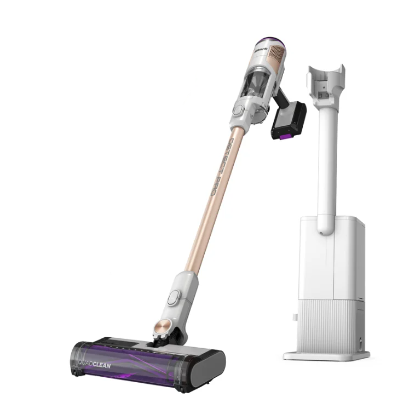
This article contains the BU3000/BU3500 Series Shark® Clean & Empty Cordless Stick Vacuum & Auto-Empty System FAQs. This supports the following models: BU3120, BU3520, BU3521, BU3521C and BU3523.
General Questions
Is the battery removable?
The battery is removable.
What do the lights on the battery mean?
Solid White LED: Battery pack is fully charged.
LED pulses green: 75% - 100% charged.
LED pulses yellow: 0 - 75% charged.
How do I assemble the vacuum?
Insert the wand into the floor nozzle.
Insert the handheld vacuum into the wand.
For proper operation, ensure all parts are firmly clicked into place.
To assemble the Auto-Empty Dock, slide the post onto the base of the Dock and plug it in a wall outlet.
How long will the battery run?
The initial charge on the battery pack (out of the box) is approximately 30%. Charge the battery completely before first use.
During first use, run the battery down until it is completely out of power. This will condition the battery.
Runtimes are based on a new, fully charged battery. Like all lithium-ion products, the battery will naturally decrease in capacity over time.
On a full charge while using ECO mode up to 40 minutes.
How do I use the different cleaning modes?
To clean in ECO mode, press the suction power mode button (fan blade icon) until the green leaf icon (see below) illuminates on the hand vac screen. The brushrolls will spin slowly to clean bare floors and small area rugs.
To clean in AUTO mode, press the suction power mode button until the Detect icon (see below) illuminates on the hand vac screen. The brushrolls will spin faster and suction will increase to pick up heavy debris. The brushroll speed and suction will decrease as debris is cleared and the floor is cleaned. To engage the brushroll, step on the floor nozzle and tilt the handheld vacuum back.
To clean in Boost mode, press the suction power mode button until the red fan icon (see below) illuminates on the hand vac screen. The brushrolls will spin faster and suction will increase to pick up heavy debris. To engage the brushroll, step on the floor nozzle and tilt the handheld vacuum back.
Tips:
- To save battery power, select ECO mode.
- For everyday cleaning power on bare floors and carpets while optimizing runtime, select AUTO Mode.
- For an extra burst of power, select Boost mode.
How do I clean above-floor areas with or without accessories?
To clean above-floor areas, press the wand release button at the top of the wand to detach the handheld vacuum. Attach an accessory to the handheld vacuum for more cleaning options.
For more cleaning reach, leave the handheld vacuum on the wand and detach the wand from the floor nozzle. Press the nozzle release button on the bottom of the wand, then gently pull up on the handheld vacuum to remove the wand. Attach an accessory to the handheld vacuum or the wand and begin cleaning.
In all settings, for an added boost of suction power, press the suction power mode button (see below) to toggle between ECO, AUTO, and Boost modes. To save battery power, select ECO mode. For everyday cleaning, optimized runtime, and power, select AUTO mode. For an extra burst of power, select Boost mode.
How do I store my vacuum?
Store your vacuum securely and out of reach of children or pets. You can dock your vacuum on the Autop-Empty dock or Charging Dock.
What does the light on the nozzle mean?
The LED on the nozzle is a Mode indicator --
AUTO Mode: When on barefloor the indicator light will be BLUE. On carpet, the light will be MAGENTA.
BOOST Mode: When in BOOST mode, the light will be MAGENTA.
ECO Mode: When in ECO mode, the light will be BLUE.
What if I experience small static shocks while vacuuming?
Certain dry conditions in winter or dry desert areas may cause common static electricity to build up in the vacuum, producing small shocks like what you might experience from contact with doorknobs, wool sweaters, or blankets. This is harmless. To avoid this, we recommend moisturizing your hands and/or removing wool socks or sweaters prior to vacuuming.
The battery seems to have a shorter runtime than expected out of the box.
The initial battery charge is approximately 30%. Charge the battery completely before first use. During first use, run the battery down until it is completely out of power. This will condition the battery. Like all lithium-ion products the battery will naturally decrease in capacity over time.
Cleaning and Maintenance
When and how do I clean the filters?
Filters may need to be cleaned if the vacuum stops picking up dirt.
To clean filters, rinse them with water only. Allow all filters to air-dry completely for up to 48 hours before reinstalling to prevent liquid from being drawn into electric parts.
Clean the pre-motor filters at least once a month and post-motor filter at least once a year. Tap off loose dirt between washes when needed. More frequent cleaning may sometimes be necessary with heavy use.
When and how do I empty the dust cup?
For optimal performance, empty the dust cup each time you vacuum. With the BU3000/BU3500 Series, the dust cup will automatically empty once docked.
To manual empty the dust cup, detach the handheld vacuum from the wand by pressing the wand release button. Position the dust cup over a trash receptacle, then press the dust cup release button on the left side on the handheld vacuum.. Tap gently to empty contents. Remove any debris or hair from the cone-shaped screen inside the dust cup. Wipe the interior of the dust cup clean if needed. Close the dust cup door, pressing it until it clicks into place.
How do I access and clean the brushroll?
Press the brushroll release button on the left side of the nozzle in order to access the brushroll.
To reattach, slide the brushroll back in place until you hear a click.
How do I charge the battery and how long does it take to charge?
To charge the battery, place your vacuum on the Auto-Empty Dock.
A full charge takes approximately 5 hours.
What if the battery is warm to the touch or indicates that it's too warm to charge?
The battery may feel warm during use. This is normal, as batteries increase in temperature slightly during discharge.
If the battery feels uncomfortably warm, stop using the vacuum and allow the battery to cool.
What should I do if my vacuum is hard to push or pull?
Check to see which setting you are using. If the unit is difficult to push or pull switch to a lower suction mode, such as ECO mode. If you are having difficulty push/pull on a certain floor type, toggle to AUTO Mode which adjusts brushroll speed based on floor type.
Auto Empty Dock Questions
How do I assembly my Auto-Empty Dock?
Make sure the Dock is facing upright. Slide the Charging Post into the slot on front of dock until it clicks. Place the dock on the floor near a wall outlet. Plug the Power Cord into the outlet, then connect the cord to the port on the back of the charging post. Store the crevice tool accessory on the mount on the dock.
When and how do I empty the Auto-Empty Dock dust bin?
The dock dust bin holds up to 30 days’ worth of dust and debris. Empty the dock dust bin when the dust bin full indicator light comes on. To remove the bin, lift it out by the handle. To empty the bin, hold it over the trash and press the release button on the side. The bottom will open to release the debris
What does the moon icon mean on the Auto-Empty Dock?
The moon icon is the Quiet Mode button. Press the button on the top of the dock that shows an image of a moon. This will initiate Quiet Mode. When the dock is in Quiet Mode, you can dock the vacuum without auto evacuation occurring.
What does the light on the Auto-Empty Dock mean?
The Dust Bin Full indicator will illuminate when the dust bin is full of debris and needs to be emptied. To reset the indicator, remove the dust bin and empty it.
How do I clean the Auto-Empty Dock filters?
To access the the Auto-Empty Exhaust Foam Filter, remove the dust bin. Before removing the Exhaust Foam Filter, vacuum off any fine debris from the surface. Lift the Exhaust Foam Filter out of the dock, then rinse it with water only (do not use soap). Allow the filter to air-dry completely before reinstalling it.
Product Specs
What is the Wattage?
240 Watts
What is the Amperage?
15 Amps
What is the Voltage?
18 Volts
What are the dimensions?
13.9"(L) * 10.4"(W) *43"(H)
What is the weight?
12.3 lbs
Available accessories and what they are for
AGENT_Available accessories and what they are for