This article contains the HP070 Series Shark NeverChange™ Air Purifier Compact Pro FAQs. This supports the following models: HP070, HP071BRN, HP072, HP072C, HP072QGD, UA075, HP072GN, HP072DG, HP072WH, HP072PL and HP072PK
General Questions
Where is the best place to put my air purifier?
This Air Purifier is designed specifically for smaller rooms, so we recommend setting it up in a bedroom, home office, nursery, or any other suitably sized room in your home. Be sure that the air purifier is placed on a flat, floor surface, near an electrical outlet. For maximum air flow, keep the air purifier at least 3 inches (10 cm) away from the wall.
What is PM?
PM stands for particulate matter. This term refers to microscopic solids or liquid droplets that are suspended in air and can cause serious health problems if inhaled. Using Clean Sense IQ™, the Shark NeverChange™ Air Purifier tracks 3 distinct sizes of particulate matter: PM1.0, PM2.5, and PM10. Each of these particulate sizes corresponds to common household pollutants. PM1.0 includes ultra-fine allergens* (allergens refers to non-living matter). PM2.5 includes smoke. PM10 includes dust and pollen.
How does this product clean my air?
The Shark NeverChange™ Air Purifier is equipped with a 3-stage HEPA filter that is designed to capture 99.98% of particles down to the 0.1–0.2 micron range, plus odors and VOCs. The cylindrical structure pulls air through the front and back sides of the air purifier and passes it through the HEPA filter. Particles such as smoke and allergens* (allergens refers to non-living matter) are then trapped in the HEPA filter, allowing only clean air to be sent back into your space.
Does this air purifier reduce odors?
Yes, the Shark NeverChange™ Air Purifier filter is equipped with activated carbon. This is designed to absorb household odors and VOCs (volatile organic compounds) such as formaldehyde, acetone, and butanol. Depending on the model purchased, the type of filter may vary. Some models of the Shark NeverChange™ Air Purifier also come with the Shark Odor Neutralizer Technology which guards against bad odors in the air for a fresher smelling home.
Does this air purifier have a HEPA filter?
Yes, this air purifier features a Shark® NanoSeal™ filter with True HEPA that captures 99.98% of particles down to the 0.1–0.2 micron range.
What is the scent in the Odor Neutralizer Technology Cartridges?
Ocean Breeze.
This is the only scent available.
Set Up/Use the Purifier
How do I set up my air purifier?
1. Set the Shark NeverChange™ Air Purifier upright, on a level floor surface. This Air Purifier is designed specifically for smaller rooms, so we recommend setting it up in a bedroom, home office, nursery, or any other suitably sized room in your home. Make sure the air purifier is at least 3 inches (10 cm) away from all walls and objects.
2. Before plugging in the air purifier for the first time, you must remove the filter and take it out of its packaging. First, carefully turn the air purifier upside down and place it on a level, floor surface. Rotate the filter door counterclockwise to the unlocked position to access the HEPA filter.
3. Take the HEPA filter out of its plastic packaging. Reinstall the HEPA filter into the air purifier in either orientation.
4. With the HEPA filter reinstalled, twist the filter door clockwise until it clicks into place.
5. Remove the Yellow Warning sticker from the front of the unit.
6. Plug the air purifier into an electrical outlet and press the power button on the top control panel.
7. When the air purifier power is on, it will begin to analyze the air quality, indicated by the rotating lights. After a few seconds, the air purifier will display the current air quality.
How can I tell if my air is clean?
The illuminated air quality ring on the front display will change color as your air quality changes. The color of the ring indicates the air quality: Blue = Good air quality, Amber = Fair air quality, Red = Poor air quality. By pressing the AIR INFO button, you can switch between air quality information displays. These include percentage of clean air and the estimated number of PM1.0, PM2.5, and PM10 particles in the surrounding area.
Other air purifier settings include fan speed (with AUTO mode), and brightness. When enabled, the AUTO mode setting automatically adjusts the fan speed of your air purifier based on the air quality. If the air quality decreases, the fan speed will increase. To activate AUTO mode, select the AUTO button on the top control panel. When this option is selected, the AUTO button will appear brighter than the other buttons. To turn off AUTO mode, press the AUTO button again or manually change the fan speed.
Why is my air quality never at 100%?
If your air quality never reaches 100%, make sure that the HEPA filter is properly installed without its original plastic packaging. If the filter is properly installed, then the dust filters may need cleaning. Note that the dust filters generally require maintenance every 1-2 months and the air purifier will indicate when on the front display. However, if a high amount of particulate matter is regularly present in your air, you may need to maintain the dust filters more often. Refer to the maintenance instructions in the instruction booklet.
Activities like smoking, burning candles, running a humidifier, opening windows, and cooking (among other things) can add more pollutants to your air. Make sure to survey your environment and remove anything that could be causing low air quality.
The sensor on the back of the air purifier may be dirty, causing a false reading. Turn off and unplug the unit. Locate the air quality sensor on the back side of the air purifier. Use a hand vacuum or hose with attachment to clean the area around the air quality sensor. Wait 30 seconds, then plug the unit into a verified working outlet. Turn the unit back on. Let it run for 24 hours and monitor the air quality throughout this time.
Why is my air quality reduced even when I am not cooking or doing anything unusual?
Air quality can change for a variety of reasons. Even everyday activities can agitate particles (such as previously settled dust) into the air, which will decrease air quality. Clean Sense IQ™ does a reading of microscopic particulate matter in the room and displays the air quality accordingly.
Why is my air quality always at 100%?
If your air purifier display reads 100%, your air quality is good. However, air quality will fluctuate as you introduce pollutants into your home. Activities like smoking, cooking, dusting, or spraying cleaning products (among other things) can add more pollutants to your air. Clean Sense IQ™ tracks this fluctuation in real time and alerts you when your air quality decreases. Air quality is measured by the amount of particulate matter in your air. To accurately calculate the percentage of air that is clean, Clean Sense IQ™ tracks 3 distinct particle sizes: PM1.0, PM2.5, and PM10. However, particles in your air can be both larger and smaller than this range. Rest assured, our Nanoseal™ True HEPA technology is cleaning the air by capturing odors and 99.98% of particles down to the 0.1–0.2 micron range. To determine if your sensor is working correctly, spray perfume or aerosol cleaning product near the sensor on the back of the air purifier.
Why is my air quality at 100%, but the air smells bad?
Air quality is measured by the amount of particulate matter in your air. To accurately calculate the percentage of air that is clean, Clean Sense IQ™ tracks 3 distinct particle sizes: PM1.0, PM2.5, and PM10. However, odors are not included in this calculation. Rest assured, our Nanoseal™ True HEPA technology is actively capturing odors and VOCs (volatile organic compounds) while your air purifier is running.
If you can see or smell that your air isn't clean, but the air purifier shows the air quality is 100%, make sure to turn the fan speed to Max. Do not use the auto setting. This will ensure your air is being cleaned, even if the sensor is showing that the particles it can sense are no longer present.’
Why is the control panel not working?
Your air purifier may have the child lock setting activated. Press and hold the BRIGHTNESS and FAN SPEED buttons for two seconds to turn this setting on or off
How do I mute the beeping?
To mute your air purifier's beeping, press and hold the AIR INFO and FAN SPEED buttons at the same time for 2 or more seconds. You will hear auditory feedback once the setting is confirmed. The beeps are now muted.
How do I unmute the beeping?
To unmute your air purifier's beeping, press and hold the AIR INFO and FAN SPEED buttons at the same time for 2 or more seconds. You will hear auditory feedback once the setting is confirmed. The beeps are now unmuted.
How do I enable Child Lock?
To enable the child lock setting and lock the top control panel buttons, hold the BRIGHTNESS and FAN SPEED buttons for 2 or more seconds. You will hear auditory feedback once the setting is confirmed. The control panel is now locked.
How do I disable Child Lock?
To disable the child lock setting and unlock the top control panel buttons, hold the BRIGHTNESS and FAN SPEED buttons for 2 or more seconds. You will hear auditory feedback once the setting is confirmed. The control panel is now unlocked.
How does the brightness setting work?
The brightness button adjusts the brightness of both the front display screen and the top control panel. Press the brightness button to switch between 3 options: full brightness, partially dim, and fully dim. In any of these brightness settings, the air purifier will continue to run in the settings that you selected.
How do I turn off the LED screen at night, but keep the air purifier running?
The brightness button adjusts the brightness of both the front display screen and the top control panel. Press the brightness button to switch between 3 options: full brightness, partially dim, and fully dim. Therefore to turn off the LED screen at night you need to press the button twice until it is fully dim. The air purifier will continue to run in the settings that you selected. To turn the display back on, simply press the brightness button again.
What accessories are included with my air purifier?
Your Shark NeverChange™ Air Purifier comes with 1 pre-installed HEPA filter and 1 mesh dust screen. Please be sure to remove the HEPA filter from its packaging before initial use. Some models of the Shark NeverChange™ Air Purifier also come with the Shark Odor Neutralizer Technology accessory.
Can I leave my air purifier on at all times (24/7)? How does that affect lifespan of the product?
While your air purifier can be left running 24/7, longer runtimes may shorten the HEPA filter lifespan. Shark® recommends keeping your air purifier in AUTO mode to optimize the HEPA filter life and performance. After 100% clean air status is achieved for 5 minutes in AUTO mode, your air purifier will enter ECO mode and further optimize your HEPA filter life.
Where do I insert the Odor Neutralizer Technology cartridge on the air purifier?
Remove the odor cartridge assembly from the aluminum bag. Flip up the handle. Align the arrow on the dial to the arrow on the top air vent. Insert the odor cartridge assembly into the air purifier. To lock and engage the odor cartridge assembly, rotate it counterclockwise until it clicks into the desired intensity setting.
If you do not want the odor neutralizer scent, you may remove the cartridge, but it is recommended to insert the dial.
How do I change the intensity of the Odor Neutralizer Technology cartridge?
Flip up the handle. Rotate the odor cartridge assembly as desired, following the intensity arrows on the dial. Rotate counterclockwise for a higher intensity, or clockwise for a lower intensity.
How to I turn off Odor Neutralizer Technology?
Flip up the handle on the odor dial. Rotate it clockwise until the 2 arrows are aligned. In this position, the odor cartridge assembly is ready for removal. To turn off the Odor Neutralizer Technology, you can either remove the odor cartridge assembly or rotate it one click in the counterclockwise direction. In this position, the Odor Neutralizer Technology is not exposed to the air flow.
Cleaning and Maintenance
How do I optimize my filter life?
To maximize your air purifier's filter life and performance, Shark® recommends leaving your unit in AUTO mode. After 100% clean air status is achieved for 10 minutes in AUTO mode, your air purifier will enter ECO mode and further optimize your filter life. Shark also recommends flipping and rotating the direction of your filter every 3 months. This will help equalize and balance the distribution of captured particles throughout the filter, allowing for extended usage.
How often do I need to replace the HEPA filter?
The Shark NeverChange HEPA Filter Technology™ allows up to 5 years of use out of a single HEPA filter.
Can I wash the HEPA filter?
No, the Shark NeverChange™ HEPA Filter is not washable. Keep the filter away from water at all times. To maximize the life of the HEPA filter, we recommend reorienting it every three months: remove the HEPA filter, turn it upside down, then reinsert it, making sure that the side that was previously on top is now on the bottom. This will help equalize the distribution of captured
particles throughout the filter, helping to extend its useful life.
How do I maintain my air purifier?
The dust filter generally requires maintenance every 1-2 months. The air purifier will indicate when on the front display. However, if a high amount of dust, dander, and debris is regularly present in your space, you may need to maintain the dust filter more often. Perform the following steps to do so:
1. Gently slide up the mesh dust filter to remove it. Check the screen for dust and debris buildup.
2. Use a vacuum cleaner on low speed with a soft brush attachment or a cloth/towel to remove debris from the dust filter. DO NOT use abrasive chemical cleaners.
3. If additional cleaning is required, rinse the dust filter with room temperature tap water. Be sure to completely dry it for 12 hours before re-installing. It is recommended NOT to use the air purifier during this dry time to prevent damaging the HEPA filter.
4. Gently reinsert the mesh dust filter into the slot on either side of the air purifier.
5. Refer to the maintenance instructions in the instruction booklet for more information.
Additionally, both the exterior and the interior of your air purifier will need to be dusted periodically. For best results, clean the air purifier every two months or more often if necessary. When cleaning dust from the exterior, use a microfiber cloth to remove debris from the surface of the unit. To sanitize, wipe down the exterior with a warm, soapy cloth. Avoid excess water and abrasive chemical cleaners to prevent damage. When cleaning dust from the interior, lift off the HEPA filter cover, remove the HEPA filter, and use a vacuum cleaner or a microfiber cloth to remove dust and debris from the interior of the unit. DO NOT use abrasive chemical cleaners on the inside of the unit. DO NOT insert cleaning instruments into the fan outlet.
How often do I have to maintain the mesh dust filter?
The dust filter generally requires maintenance every 1-2 months. The air purifier will indicate when on the front display with a red pulsing ring. At this time, be sure to check and clean the mesh dust filter to help keep your air purifier working optimally for longer.
How do I clean the mesh dust filter?
The dust filter generally requires maintenance every 1-2 months. The air purifier will indicate when on the front display. However, if a high amount of dust, dander, and debris is regularly present in your space, you may need to maintain the dust filter more often. Perform the following steps to do so:
1. Gently slide up the mesh dust filter to remove it. Check the screen for dust and debris buildup.
2. Use a vacuum cleaner on low speed with a soft brush attachment or a cloth/towel to remove debris from the dust filter. DO NOT use abrasive chemical cleaners.
3. If additional cleaning is required, rinse the dust filter with room temperature tap water. Be sure to completely dry it for 12 hours before re-installing. It is recommended NOT to use the air purifier during this dry time to prevent damaging the HEPA filter.
4. Gently reinsert the mesh dust filter into the slot on either side of the air purifier.
5. Refer to the maintenance instructions in the instruction booklet for more information.
How often do I need to replace the Odor Neutralizer Technology cartridge?
The Odor Neutralizer Technology in your air purifier is recommended to be replaced every 3 months, or as needed. Visit qr.sharkclean.com/odortech to learn more and purchase replacements.
How do I replace the Odor Neutralizer Technology cartridge?
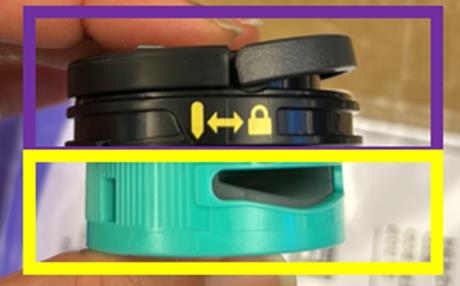
1. Flip up the handle and rotate the dial clockwise until the two arrows are aligned. Pull the handle to remove the odor dial from the air purifier.
2. Rotate the cartridge counterclockwise in the dial housing and pull out the cartridge to remove it.
3. Remove the new odor cartridge from the sealed packaging. To maintain the life of the cartridge, keep it in the sealed packaging until you are ready to install it.
4. Align the yellow arrow on the side of cartridge with the yellow arrow on the side of the dial cover, then insert the cartridge into the dial. Rotate the cartridge counterclockwise to lock it in place.
5. Flip up the handle on the odor dial. Align the arrow on the dial to the arrow on the top air vent. Insert the odor cartridge assembly into the air purifier.
6. To lock and engage the odor cartridge assembly, rotate it counterclockwise until it clicks into the desired odor intensity setting.
7. Dispose of the old cartridge by dropping it into the trash.
Odor Neutrailizer Technology
I cannot smell the Odor Neutralizer Technology.
The intensity of the odor neutralizer technology’s fragrance may diminish over time. It may also have no noticeable fragrance at all. This is natural and does not indicate that the technology is not working. Follow the recommended replacement schedule to ensure continued performance. Visit qr.sharkclean.com/odortech to learn more and to purchase replacements.