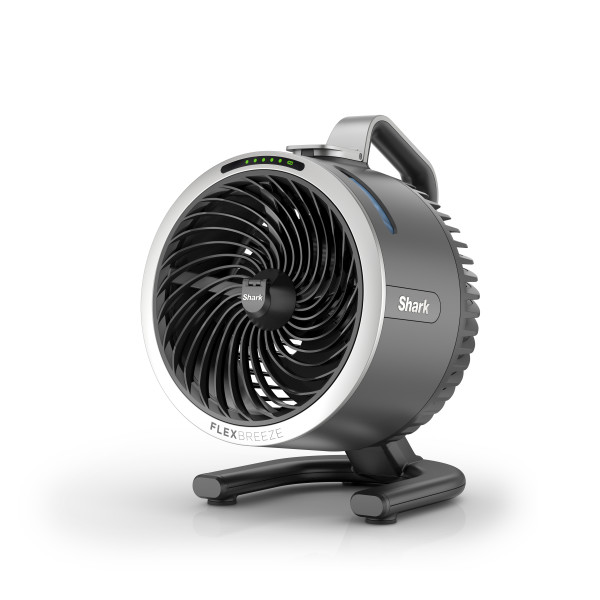
This article contains the FA050 Series Shark™ FlexBreeze™ HydroGo Fan FAQs. This supports the following models: FA052C, FA052, FA052DV, FA052GN, FA052LV, FA052BL, FA052PK, FA052BLBRN, FA053BRN, FA052QDG, FA052QBL, FA052QGN and FA052QLV.
General Questions
Can I use this fan in non-US outlets?
Do not attempt to use a US wall charger in any outlet outside of the United States. Do not attempt to use a converter.
What outlets can I use with my charger?
Only use wall plugs that are type A (2 prongs) or Type B (3 prongs).
What outlets can I use with my car charger accessory?
Only use car charger with a 12V car outlet.
How many speeds does my fan have?
Your fan has 5 traditional speeds and 3 custom settings: BreezeBoost™, Strong NaturalBreeze, and Gentle NaturalBreeze. To select a setting, press the fan speed button on the fan head. LED lights will temporarily indicate which speed is selected.
What tilting settings does my fan have?
Your fan can be manually tilted by using the handle to angle it upwards or downwards. The fan has a tilting range of 45 degrees.
How do I turn on BreezeBoost™ mode?
To turn on BreezeBoost™ mode on the fan head, press the fan speed button to cycle through the settings. The cycle order is: Speed 1, Speed 2, Speed 3, Speed 4, Speed 5, BreezeBoost™. LED lights will temporarily indicate which setting is selected.
How do I turn on NaturalBreeze modes?
To turn on either of the NaturalBreeze modes on the fan head, press the fan speed button to cycle through the settings.
The cycle order is: Speed 1, Speed 2, Speed 3, Speed 4, Speed 5, Strong NaturalBreeze, Gentle NaturalBreeze. LED lights will indicate which setting is selected.
How do I turn on misting?
Your fan has 2 custom misting settings. To turn on misting, press the water droplets button on the fan head until you reach your desired setting. The cycle order is as follows: consistent and interval. LED lights will temporarily indicate which setting is selected.
How do I turn off misting?
To turn off misting, press the water droplets button on the fan head until the misting LED light turn off. Alternatively, hold down the water droplets button on the fan head for 3 seconds. You'll see the misting LED light turn off.
How long does the fan take to charge?
To fully charge from 0% to 100%, the fan will take approximately 3 hours.
How long will the fan run on a full charge?
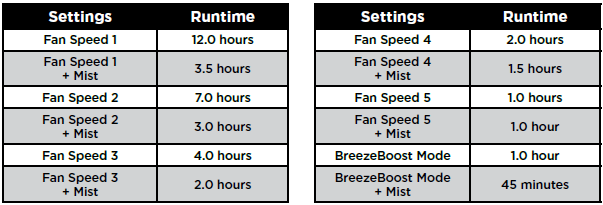
The fan will operate at about 12 hours on fan speed 1, 4 hours on fan speed 3, and 1.5 hours on fan speed 5. For a full list of fan speeds, please see the online instructional booklet.
Can I leave the fan outdoors?
This fan is rain-resistant (IPX5) and can handle light rain without damage. However, it is not designed to withstand heavy rain or being submerged in water. It is recommended to bring the fan indoors if inclement weather is predicted. Additionally, it is recommended to store the fan indoors when not in use for extended periods.
DO NOT charge or use your unit in the rain.
Cleaning and Maintenance
Why do I have to activate Lock Mode before maintenance or to travel?
Since the fan can be used cordlessly, there is a risk of the fan turning on when it is not plugged in. Activating Lock Mode prevents any risk of the fan turning on by mistake during maintenance when the fan blades are exposed.
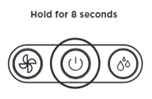
To activate Lock Mode hold down the Power icon on the fan head for 8 seconds until the LEDs flash.
Lock Mode will automatically deactivate after 24 hours.
How often should I clean the fan?
Go to 0:58 in the video above for instructions on how to perform a clean soak of your Shark FlexBreeze™ HydroGo™.
It is recommended to perform a clean soak weekly or as needed. Ensure you empty and dry the water tank completely after every use.
To perform a clean soak:
- Activate LOCK MODE by holding down the power button for 8 seconds until the lights flash. This will temporarily disable all fan functions to prevent the fan from accidentally turning on during maintenance.
- Fill the water tank with 150ml of undiluted distilled white vinegar (5% acetic acid by volume) and let sit for 5–7 minutes. DO NOT let the vinegar sit for more than 15 minutes.
- Carefully dump the vinegar out of the tank.
- Refill the tank with clean tap or filtered water. Do not use distilled water.
- Ensure the water tank and misting cap are fully sealed, then shake the unit for 10 seconds.
- Carefully dump the water out of the tank
- Repeat steps 4, 5 and 6 once more to thoroughly rinse the water tank.
- Deactivate LOCK MODE by holding down the power button for 8 seconds until the lights show the startup pattern.
Please allow the water tank to dry completely before using the unit again.
Using the Fan
Why is the fan battery LED blinking green?
The fan battery LED will blink green when the unit is charging.
Why is the fan battery LED green?
The fan battery LED will be green when the unit has 70% to 100% battery.
Why is the fan battery LED yellow?
The fan battery LED will be amber when the unit has 30% to 69% battery.
Why is my fan battery LED blinking yellow?
The fan battery LED will blink yellow when there is an issue with the voltage of the charger.
Note: Please be sure to only use the provided Shark charging cable and power supply.
Why is the fan battery LED red?
The fan battery LED will be red when the unit has 6% to 29% battery.
Why is my fan battery LED blinking red?
The fan battery LED will blink red when the unit has 5% or less battery.
Why is my fan battery LED blinking blue?
The fan battery LED will blink blue to indicate when the fan has overheated. Place unit in a cool space and do not use it for 30 minutes.
Product Specs
What are the dimensions of the fan?
The dimensions of the unit in pedestal mode are 8.4in x 8.9in x 11.3in
How heavy is the fan?
The fan is 4 pounds in pedestal mode with an empty water tank
What are the dimensions of the box?
The dimensions of the box are 10in x 9.4in x 12.8in
What is the voltage / amperage of the fan?
12 volts / 3 amps
What is the wattage of the fan?
36 watts
What is the milliwatt hours (mAh) of the battery?
4000 mAh
What is the runtime of the fan?
Without misting the fan will operate for up to 12 hours on fan speed 1, up to 4 hours on fan speed 3, and up to 1 hour on fan speed 5.
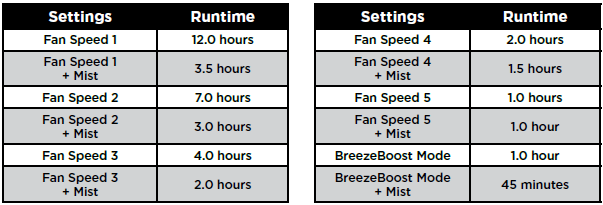
Please note: The maximum runtime for this fan is 12 hours when on the lowest setting.
What is the noise of the fan?
The sound power of the fan at the minimum setting without oscillation or misting is less than 38 dbA and 65 dbA at max power with mist on.
What is the misting range of my fan?
Up to 4 ft
How long is the charging cable for this fan?
This fans charging cord is 6 feet.
What is the CFM for this fan?
440 CFM
What is the temperature drop my fan can achieve with misting?
Up to 5 degrees Fahrenheit*
What is the maximum capacity of the water tank?
5.7 oz