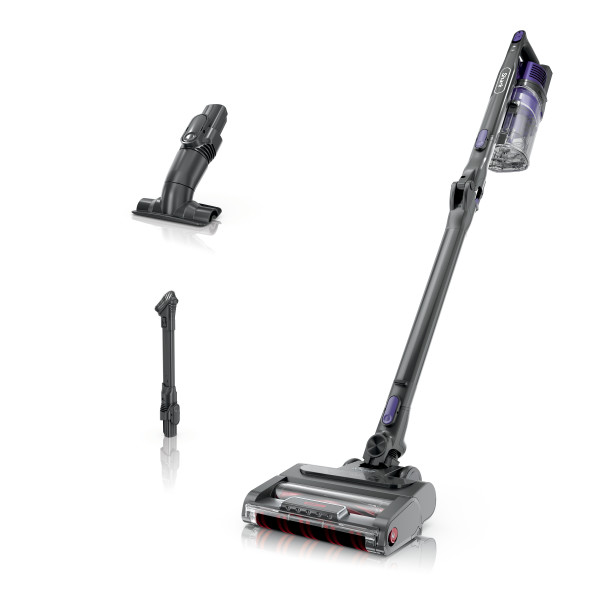
This article contains the IZ492H Shark® Vertex® MultiFLEX®Cordless Vacuum FAQs.
General Questions
What is MultiFLEX technoWhat is MultiFLEX technology?
MultiFLEX® technology allows the wand to bend, making it easy to clean under furniture. The MultiFLEX® wand also folds over for freestanding, compact storage.
- To bend the wand, press the unlock latch on the back, then adjust the wand angle.
- For storage, turn off the vacuum and press the unlock latch on the back of the wand. Fold the handheld vacuum forward toward the floor nozzle.
How do I assemble the vacuum?
- Insert the wand into the floor nozzle.
- Insert the handheld vacuum into the wand.
For proper operation, ensure all parts are firmly clicked into place.
How do I attach accessories to the vacuum?
There are two ways to clean with the accessories.
Either separate the handheld portion from the rest of the vacuum by pressing the "Handvac Release" button or keep the wand connected to the handheld and remove the floor nozzle by pressing the "Wand Release" button. Choose the desired cleaning accessory and slide it onto the end of the handheld vacuum or the end of the wand. You will hear a click when it is appropriately attached.
How long does it take to fully charge the battery?
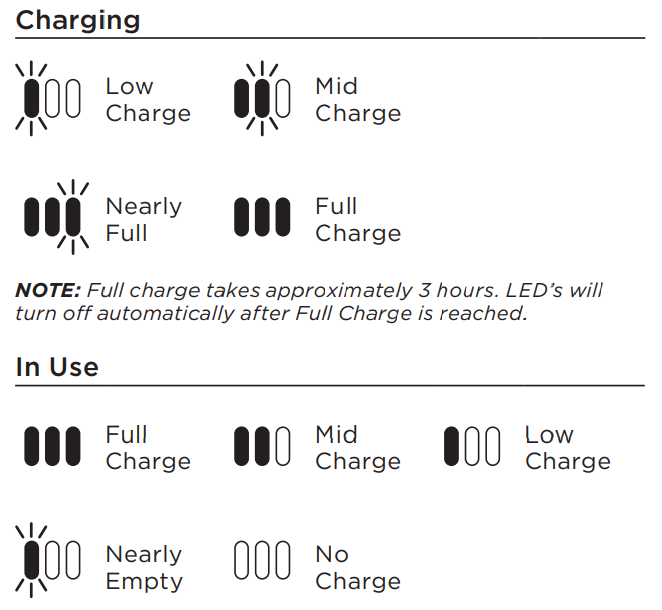
It takes approximately 3 hours to reach a full charge.
What is the runtime of the battery on a full charge?
The initial charge on the pack (out of the box) is approximately 30%. We recommend fully charging the battery before initial use.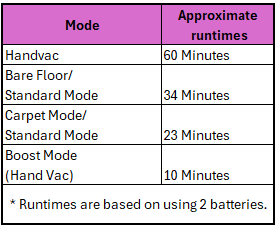 Like all lithium-ion products, the battery will naturally decrease in capacity over time.
How do I store the vacuum?
Store your vacuum securely and out of reach of children or pets.
If your vacuum is equipped with a MultiFLEX wand, you can store it in a compact, upright position.
- Press the unlock latch on the back of the wand, then fold the handheld vacuum forward, toward the floor nozzle.
- Another option is to simply place the vacuum flat on the floor. The rubber pads on the base of the handheld vacuum will prevent scratching.
Is the battery removable?
Yes the battery is removeable.
What do the lights on the battery mean?
Using the Vacuum
How do I clean above floors with or without accessories?
To clean above-floor areas with the handheld, press the wand release button on the front of the wand, then gently lift off the handheld vacuum.
For more cleaning reach, leave the handheld vacuum on the wand, and detach the wand from the floor nozzle. Press the nozzle release button on the bottom of the wand, then gently pull up on the handheld vacuum to remove the wand.
Attach an accessory to the handheld vacuum or the wand and begin cleaning.
How do I use the different cleaning modes?
To clean bare floors or small area rugs:
- Turn on the power by sliding the selector switch to the middle setting (Hard Floor/Small Rugs).
- To engage the brushroll, step on the floor nozzle and tilt the handheld vacuum back.
To clean carpets:
- Turn on the power by sliding the selector switch to the Carpet setting.
- To engage the brushroll, step on the floor nozzle and tilt the handheld vacuum back.
To clean above floors:
- Press the wand release button at the top of the wand to detach the handheld vacuum.
- Attach an accessory to the handheld vacuum for more cleaning options.
In all settings, for an added boost of suction power, pull the BOOST trigger.
How do I turn the vacuum off?
To turn the vacuum off, slide switch to the bottom to turn off power.
Cleaning and Maintenance
How do I clean the filters and how often?
Filters may need to be cleaned if the vacuum stops picking up dirt, if airflow is restricted, or if you notice decreased or no suction. For optimal performance, clean filters regularly. Between cleanings, lightly tap filters over a trash receptacle to remove dust and debris as needed.
Rinse the pre-motor foam and felt filters every month, or as needed.
- First, remove the dust cup to access the pre-motor filters. Press the release button on the handheld vacuum, then pull the dust cup down and away to remove.
- Remove the foam and felt filters using the tab provided.
- Rinse both filters with water only.
- Allow filters to air-dry completely (at least 24 hours) before reinstalling.
- Once dry, install the foam filter first, followed by the felt filter.
- Reinstall the dust cup.
Rinse the post-motor HEPA filter every 12 months, or as needed.
- Remove the dust cup by pressing the release button on the handheld vacuum, then pulling the dust cup down and away.
- The post-motor filter is attached to a plastic frame inside the handheld vacuum. Press the tabs and pull the filter off the frame.
- Rinse the post-motor filter with water only.
- Allow filter to air-dry completely (at least 24 hours) before reinstalling.
- Once dry, reinstall the post-motor filter.
- Reinstall the dust cup.
How do I empty the dust cup and how often?
For optimal performance, empty the dust cup each time you vacuum, or when debris reaches the MAX FILL line.
- Turn off the vacuum.
- Detach the handheld vacuum from the wand by pressing the wand release button.
- Position the dust cup over a trash receptacle, then open the bottom dust cup door by sliding the CleanTouch™ Dirt Ejector slider forward.
- Tap gently to empty contents.
- Wipe the interior of the dust cup clean if needed.
- Close the dust cup door, pressing it until it clicks into place.
How do I access and clean the DuoClean PowerFins brushroll and soft roller?
For the PowerFins Roller:
- Turn the floor nozzle over and use a coin to turn the locks on the bottom cover counterclockwise. Lift off the cover to access the brushroll.
- Clear away any string, hair, or debris wrapped around the brushroll and in the nozzle openings.
- To reattach the bottom cover, press down firmly along all sides. Turn the locks clockwise to close.
For the Soft Roller:
- Slide the eject tab on the left side of the nozzle and pull out the soft roller.
- Clear away any string, hair, or debris wrapped around the soft roller and in the nozzle openings.
- Handwash the soft roller as needed, using only water. Let air dry completely for 24 hours before use.
- To reattach the soft roller, just snap back into place.
How do I charge the battery?
Charge the battery by plugging the charger into the port on the handheld vacuum. Use only Shark® chargers and charging docks.
What if the battery is warm to the touch or indicates that it's too warm to charge?
The battery may feel warm in use, which is completely normal, as its temperature will rise slightly as it discharges. If the battery feels uncomfortably warm, stop using the vacuum and allow the battery to cool. If the unit stops working, check the battery indicator lights for any error messages.
If the battery is too warm after use, the charger will pause until the battery cools before it begins charging.
What should I do if my vacuum is hard to push or pull?
Check to see which setting you are using.
The power/selector switch on the handle allows you to adjust suction power as well as brushroll speed.
- For thick/high pile carpets, use the Carpet setting. This is the default carpet setting and provides high suction power.
- For area rugs, mats, and specialty carpets, use the middle setting, Hard Floor/Area Rugs.
- Use the BOOST trigger for maximum suction power when cleaning.
What happens if I experience small static shocks while vacuuming?
Certain dry temperatures in winter or dry desert areas may cause common static electricity to build up in the vacuum, producing small shocks, similar to what you might experience from contact with doorknobs, wool sweaters, or blankets. This is harmless. In order to avoid this, we recommend moisturizing your hands and/or removing wool socks or sweaters prior to vacuuming.
Product Specs
What is the dirt capacity of the dust cup?
0.34 dry quarts
What is the Voltage?
25.2 Volts
What is the Wattage?
281 Watts