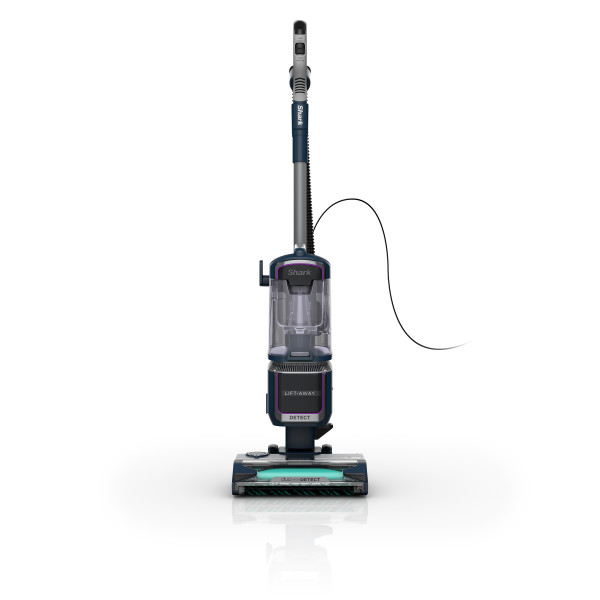
This article contains the FAQs for the UV950 Series Shark Detect™ Performance with Lift-Away® ADV.
General Questions
How do I use the different cleaning modes?
This Shark vacuum has three powerful settings for cleaning. The mode slider is located on the pod, near the wand.
Mode Slider: To switch between modes, gently slide the mode switch on the pod to toggle between cleaning modes.
Detect Mode: Select Detect mode to activate Smart Detect Technology. In this mode, the vacuum will detect floor type and direction, and will automatically adjust suction to maximize cleaning performance.
Manual Surface Modes: Select one of the manual surface modes (Hard Floor or Carpet) to clean specific surfaces without Smart Detect Technology. Adjust the suction slider at the handle
- Select Hard Floor Mode for surfaces like wood or tile
- Select Carpet mode for both low- and high-pile carpets
Note: Use Hard Floor setting for maximum suction when cleaning above floors and for easier maneuverability on low pile area rugs.
Suction Slider: This vacuum is equipped with an adjustable slider on the handle. Set the suction to MAX for hard floors and low pile carpets for the best cleaning performance. Set the suction to MIN when on plush or high pile carpets for easier maneuverability.
How do I detach the pod for portable above-floor cleaning?
To clean above-floor areas in Lift-Away mode:
- First release the power cord by turning the top cord hook downward.
- Step on the Lift-Away® pedal on the side of the pod to detach the pod from the nozzle.
- Lift off the pod by pulling up on the dust cup handle.
- Detach the wand from the pod by pressing the wand release button.
- To vacuum with the handle, press the release button to detach the handle from the top of the wand.
- For more reach, reattach the handle to the wand.
- You can attach a cleaning accessory to either the handle or the end of the wand.
What should I do if my vacuum is hard to push or pull?
Adjust the suction control slider on the handle to decrease suction.
Check to see which floor setting you are using.
- If you're in a manual surface mode, ensure this matches the floor type you're cleaning.
- If you are using DETECT mode, try manually overriding for better maneuverability. For manual override on thicker carpet types, select Thick Carpet/Area Rug and slide the suction control valve on the handle to MIN. This setting reduces suction and should allow for easier use on carpet.
If the vacuum is stalling on thick carpet, try doing manual override to Carpet mode and adjust suction on the handle to MIN as this is optimized to not stall on thicker carpets.
What happens if I experience small static shocks while vacuuming?
Certain dry temperatures in winter or dry desert areas may cause common static electricity to build up in the vacuum, producing small shocks, similar to what you might experience from contact with doorknobs, wool sweaters, or blankets. This is harmless. In order to avoid this, we recommend moisturizing your hands and/or removing wool socks or sweaters prior to vacuuming.
How do I assemble my vacuum?
- Insert the pod onto the nozzle.
- Insert the wand into the pod and slide it down until it clicks in place.
- Insert the handle into the top of the wand.
- Connect the hose to the back of the pod.
- Remove the Odor Neutralizer Technology dial from the bag. Flip up the dial handle, align the teal arrow on the dial with the teal arrow on the nozzle, then insert the dial into the nozzle.
- Lock and engage the dial by rotating it counterclockwise until it clicks into the desired odor intensity setting.
- Store included accessories on the accessory posts on the pod.
For proper operation, ensure all parts are firmly clicked into place.
What do the different color head lights mean?
The headlights will flash or turn red to indicate issues that need attention.
Solid White Lights: The brushrolls are spinning and the unit is working as it should.
Solid Red Lights: There is a jam in the brushroll area. Turn off the vacuum and unplug it, then remove any blockages in the nozzle.
Flashing Red Lights: The motorized floor nozzle is overheating. Turn off the vacuum, unplug it, and remove any blockages. Let the vacuum cool down for at least 60 minutes before restarting. See Troubleshooting section for more information.
Flashing White Lights: The vacuum is operating in an environment that is either too hot or too cold. This vacuum will only function properly in temperatures ranging from 32°F (0°C) to 104°F (40°C). Turn the vacuum off and adjust the room temperature.
Maintenance
When and how do I clean the filters?
Filters may need to be cleaned if the vacuum stops picking up dirt, if airflow is restricted, or if you notice lighter or no suction. For optimal cleaning and odor neutralizer technology performance, clean filters regularly. Between cleanings, lightly tap filters over a trash receptacle to remove dust and debris as needed.
Rinse the pre-motor foam and felt filters with cold water every month, or as needed.
- Remove the dust cup by sliding the release tabs on the dust cup handle. Lift the dust cup from the pod to access the pre-motor filters.
- Remove the foam and felt filters from underneath the dust cup.
- Rinse both filters with water only.
- Allow filters to air-dry completely (at least 24 hours) before reinstalling.
- Once the filters have dried, install the felt filter first, followed by the foam filter.
- Reinstall the dust cup by placing the bottom of the dust cup into the pod and then tilting until it clicks into place.
Rinse the post-motor HEPA filter with cold water every 12 months, or as needed.
- With the dust cup removed, pull the tab on the bottom of the pod to release the HEPA filter cover.
- Press the latch on the HEPA filter to remove the filter.
- Rinse with water only.
- Allow filter to air-dry completely (at least 24 hours) before reinstalling.
- Once the HEPA filter has dried, reinstall it.
- Reattach the HEPA filter cover until it clicks into place.
When and how do I empty the dust cup?
For optimal performance, empty the dust cup each time you vacuum, or when debris reaches the MAX FILL line.
- To remove the dust cup, slide the release tabs on the dust cup handle. Tilt the dust cup away from the wand, then lift it off.
- Hold the dust cup over the trash. Press the upper release button on the back of the dust cup and the bottom lid will drop open.
- Tap the dust cup gently to empty contents.
- Close the bottom lid by pressing until it clicks into place.
- Open the top lid on the dust cup by lifting the upper release tab on the front, near the Shark logo.
- Turn the dust cup over to empty it into the trash. Tap it gently to shake loose dust and dirt. Clear debris from the cone-shaped screen inside the dust cup.
- Close the top lid by pressing until it clicks into place.
- To reinstall, place the bottom of the dust cup into the pod, then tilt it toward the wand until it clicks into place.
How do I clean the main brushroll?
If any hair is wrapped around the brushroll, continue vacuuming, using Carpet/Low Pile mode on a bare floor surface, a low-pile carpet, or a small area rug. This will allow the self-cleaning brushroll to remove the hair wrap and send it to the dust cup.
If the issue persists:
- Detach the pod from the nozzle by stepping on the Lift-Away® pedal below the vacuum pod.
- Turn the nozzle over to access the brushroll. Using scissors, carefully remove any string, hair, or debris that may be wrapped around the brushroll.
- Reattach the pod to the nozzle, pressing until it clicks into place.
Note: Do not vacuum wet messes.
Odor Neutralizer Technology
I dislike the scent / its too intense at the lowest setting. Can I remove the odor neutralizer technology system?
The odor dial cover needs to be installed for the vacuum to function properly. If you do not wish to use the odor neutralizer technology system, please follow the below steps:
- Remove the odor dial from the nozzle. Flip up the handle and rotate the dial clockwise until the two teal arrows are aligned. Pull the handle to lift the dial out of the nozzle.
- Remove the odor cartridge by rotating the cartridge counterclockwise in the dial housing and pull out the cartridge.
- Install the dial cover back into the nozzle without the cartridge. Align the teal arrow on the dial cover with the teal arrow on the nozzle, then reinsert the dial cover into the nozzle. To lock, rotate the cover counterclockwise until it clicks into place.
- Dispose of cartridge by dropping it in the trash.
Do I need to replace my Odor neutralizer technology cartridge?
Yes, odor neutralizer technology cartridges should be replaced every 6 months for optimal performance.
How do I Install the odor neutralizer technology system?
Remove the odor neutralizer technology dial from the bag. Flip up the dial handle, align the teal arrows, then insert the dial into the nozzle.
To lock and engage the dial, rotate it counterclockwise until it clicks into the desired odor intensity setting.
Detect Technology Suite
Why would I use DETECT mode?
Detect mode allows you to use the vacuum with new Smart Detect Technology activated. In this mode, the vacuum will detect floor type and direction, and will automatically adjust suction to maximize cleaning performance. We recommend using this mode for best user experience.
What is Floor Detect? / Sensor Maintenance (Why isn't Floor Detect working?)
Floor Detect identifies surface type and adjusts brushroll speed and suction for optimized cleaning.
Maintenance:
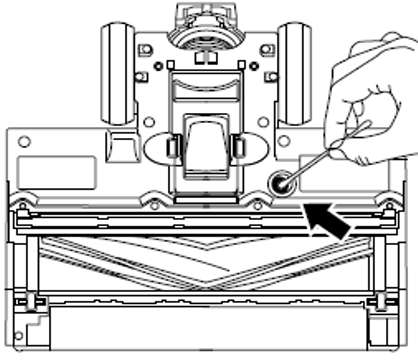
Make sure to clean the Floor Detect sensor regularly, as hair and other debris may build up and obstruct the sensors. If the sensor is partially obstructed, Floor Detect mode will not function as expected.
To easily access the nozzle for sensor cleaning, step on the Lift-Away(R) pedal to detach the pod.
Locate the Floor Detect sensor on the bottom of the nozzle.
Use a cotton swab to wipe away dirt and debris from the sensor and surrounding area.
Why does the display on the nozzle switch icons?
The LED display on the nozzle is the Floor Detect Indicator. When in Detect mode, the vacuum will sense floor type and adjust brushroll speed and suction automatically. The icon that's illuminated on the nozzle will change as you transition floor types.
What is Direction Detect?
Direction Detect senses cleaning direction and directs suction forward or reverse for optimized cleaning.
Product Specs
What is the weight?
14.86 lbs
What is the cord length?
The cord is 30 feet long.
What is the dust cup capacity?
0.74 Quarts
What are the dimensions of the vacuum?
12"(L) x 10.75"(W) x 45.55"(H)
What is the wattage?
960 watts
What is the Voltage?
120V
What is the amperage?
8 Amps
What is the scent in the Odor Neutralizer Technology Cartridges?
Ocean Breeze.
This is the only scent available.