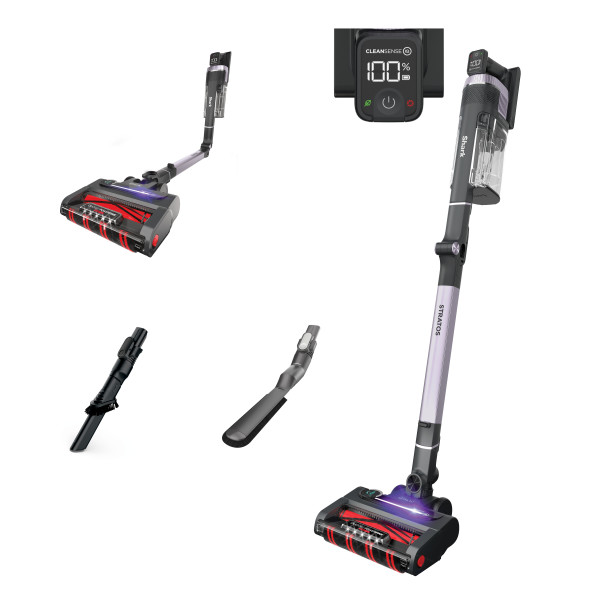
This article contains the IZ800 Series Shark® Stratos™ Cordless MultiFLEX® Vacuum FAQs. This supports the following SKUs IZ840H, IZ862H, UZ865H and UZ865HCCO.
Is the battery removable?
The battery on the IZ800 Series is removable. To charge the battery, plug the charger directly into the port on the handheld vacuum. The batteries on the IZ840/IZ860 series are removable and can be charged in the unit or out of it.
What do the lights on the battery mean?
No LED: the battery pack is off.
LED pulses yellow: 0 - 75% charged.
LED pulses green: 76% - 99% charged.
LED pulses white: 100% charged.
How do I charge the battery and how long does it take to charge?
Charge the battery by plugging the charger into the port on the handheld vacuum. Charging can take up to 3.5 hours.
How long will the battery run?
This would vary on the mode you are using.
Hand vacuum ECO Mode: approximately 60 minutes
Bare Floor Mode – ECO Mode: approx. 46 minutes
Carpet Mode – ECO Mode: approx. 30 minutes
Boost Mode (Hand Vac): approx. 10 minutes
The battery seems to have a shorter runtime than expected. What should I do? (Out of the box)
The initial battery charge is approximately 30%. Charge the battery completely before first use. During first use, run the battery down until it is completely out of power. This will condition the battery. Like all lithium-ion products the battery will naturally decrease in capacity over time.
What does it mean if an error code appears?
See the chart in the Troubleshooting section of the WEBSITE for more information.
What if the battery is warm to the touch or indicates that it's too warm to charge?
The battery may feel warm during use. This is normal, as batteries increase in temperature slightly during discharge.
When and how do I clean the filters?
Filters may need to be cleaned if the vacuum stops picking up dirt.
To clean filters, rinse them with water only. Allow all filters to air-dry completely for up to 48 hours before reinstalling to prevent liquid from being drawn into electric parts.
Clean the pre-motor filters at least once a month and post-motor filter at least once a year. Tap off loose dirt between washes when needed. More frequent cleaning may sometimes be necessary with heavy use.
When and how do I empty the dust cup?
For optimal performance, empty the dust cup each time you vacuum or when debris reaches the MAX FILL line.
How do I access and clean the DuoClean® PowerFins™ brushroll and Soft Roller?
Turn the floor nozzle over and use a coin to turn the locks on the bottom cover counterclockwise. Lift off the cover to access the brushroll. Clear away any string, hair, or debris wrapped around the brushroll and in the nozzle openings.
How do I assemble the vacuum?
Insert the wand into the floor nozzle.
Insert the handheld vacuum into the wand.
For proper operation, ensure all parts are firmly clicked into place.
How do I use the different cleaning power modes?
Press the Power button to turn the vacuum on or off.
-To clean in ECO mode, press the suction power mode button (fan blade icon) until the green leaf icon illuminates on the hand vac screen. The brushrolls will spin slowly to clean bare floors and small area rugs.
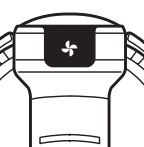
Press the suction power mode button again to cycle to Clean Sense IQ and Boost modes. To engage the brushroll, step on the floor nozzle and tilt the handheld vacuum back.
-To clean in Clean Sense IQ mode, press the suction power mode button until the Clean Sense IQ icon illuminates on the hand vac screen. The brushrolls will spin faster and suction will increase to pick up heavy debris. The brushroll speed and suction will decrease as debris is cleared and the floor is cleaned. To engage the brushroll, step on the floor nozzle and tilt the handheld vacuum back.
-To clean in Boost mode, press the suction power mode button until the red fan icon illuminates on the hand vac screen. The brushrolls will spin faster and suction will increase to pick up heavy debris. To engage the brushroll, step on the floor nozzle and tilt the handheld vacuum back.
- To save battery power, select ECO mode. For everyday cleaning power on bare floors and carpets while optimizing runtime, select Clean Sense IQ Mode. For an extra burst of power, select Boost mode.
How do I clean above-floor areas with or without accessories?
To clean above-floor areas, press the wand release button at the top of the wand to detach the handheld vacuum. Attach an accessory to the handheld vacuum for more cleaning options.
For more cleaning reach, leave the handheld vacuum on the wand and detach the wand from the floor nozzle. Press the nozzle release button on the bottom of the wand, then gently pull up on the handheld vacuum to remove the wand. Attach an accessory to the handheld vacuum or the wand and begin cleaning.
In all settings, for an added boost of suction power, press the suction power mode button (see below) to toggle between ECO, Clean Sense IQ, and Boost modes. To save battery power, select ECO mode. For everyday cleaning, optimized runtime, and power, select Clean Sense IQ Mode. For an extra burst of power, select Boost mode.
What is MultiFLEX technology and how do I use it?
MultiFLEX technology allows the wand to bend, making it easy to clean under furniture. The MultiFLEX wand also folds over for freestanding, compact storage. To bend the wand, press the unlock latch on the back, then adjust the wand angle. For storage, turn off the vacuum and press the unlock latch on the back of the wand. Fold the handheld vacuum forward toward the floor nozzle.
How do I store my vacuum?
Store your vacuum securely and out of reach of children or pets. You can fold the wand over for freestanding compact storage. Press the unlock latch on the back of the wand then fold the handheld vacuum forward toward the floor nozzle. Another option is to simply place the vacuum flat on the floor. The rubber pads on the base of the handheld vacuum will prevent scratching.
What should I do if my vacuum is hard to push or pull?
Check to see which setting you are using. If the unit is difficult to push or pull switch to a lower suction mode, such as ECO mode. The floor select button on the handle allows you to adjust suction power as well as brushroll speed. For thick/high pile carpets use the Carpet setting. Press the floor select button until the Carpet icon illuminates. For area rugs, mats, and specialty carpets, press the floor select button until the Hard Floor icon illuminates.
What if I experience small static shocks while vacuuming?
Certain dry conditions in winter or dry desert areas may cause common static electricity to build up in the vacuum, producing small shocks like what you might experience from contact with doorknobs, wool sweaters, or blankets. This is harmless. To avoid this, we recommend moisturizing your hands and/or removing wool socks or sweaters prior to vacuuming.
Why is my vacuum stuck in Boost mode when Clean Sense IQ is selected?
Turn off the vacuum. Then remove the hand vac.
Locate the sensors inside the nozzle of the hand vacuum. The sensors are on the interior walls of the nozzle, about 3 inches down the air path, aligned with the IQ logos on the exterior.
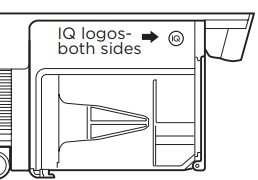
Using a microfiber cloth, gently wipe the two sensors inside the airpath and remove any hair or trapped debris that could obstruct the sensors.
Allow the vacuum to reset for up to 30 seconds before turning it back on.
Turn on the vacuum to verify that the sensor obstruction has been cleared and the unit is functioning normally.
Why is Clean Sense IQ mode not functioning as expected?
Clean Sense IQ is reacting to debris that may be stuck around or on the sensors. Additionally, a clog in front of the Clean Sense IQ sensors could be the source of the malfunction. Remove all clogs and obstructions from the sensors:
Turn off the vacuum, and remove the hand vac.
Locate the sensors inside the nozzle of the hand vacuum. The sensors are on the interior walls of the nozzle, about 3 inches down the air path, aligned with the IQ logos on the exterior.
Using a microfiber cloth, gently wipe the two sensors inside the airpath and remove any hair or trapped debris that could obstruct the sensors.
Allow the vacuum to reset for up to 30 seconds before turning it back on.
Turn on the vacuum to verify that the sensor obstruction has been cleared and the unit is functioning normally.
What does the light on the nozzle mean?
The Clean Sense IQ indicator light on the nozzle communicates to the user if the area is clean of debris. If the light bar is illuminated, the system has detected heavy debris and will increase brushroll speed and suction until the debris is cleaned. When the light bar turns off, the area is clear of debris.
How do I Install the Odor Neutralizer Technology system?
- Remove the Odor Neutralizer Technology dial from the bag.
- Flip up the dial handle, align the teal arrows, then insert the dial into the nozzle.
- To lock and engage the dial, rotate it counterclockwise until it clicks into the desired odor intensity setting.
How do I replace the cartridge in the Odor Neutralizer Technology system?
- Flip up the handle and rotate the dial clockwise until the two teal arrows are aligned. Pull the handle to lift the dial out of the nozzle.
- Rotate the cartridge counterclockwise in the dial housing and pull out the cartridge.
- Remove the new odor cartridge from the sealed packaging. To maintain the life of the cartridge, keep it in the sealed packaging until you are ready to install it.
- Align the yellow arrow on the side of the cartridge with the yellow arrow on the side of the dial cover, then insert the cartridge into the dial.
- Lock the cartridge in place by rotating it clockwise until the yellow arrow on the cartridge clicks into place and points to the yellow lock on the dial cover.
- Align the teal arrow on the dial cover with the teal arrow on the nozzle, then reinsert the dial into the nozzle. Rotate the dial counterclockwise until it clicks into an intensity setting to engage. Rotate further to change the intensity setting.
- Dispose of the old cartridge by dropping it in the trash.
How do I adjust the intensity setting of the Odor Neutralizer Technology system?
- Flip up the dial handle and rotate the dial to adjust the intensity or to unlock the dial for cartridge access.
- To reduce the odor Intensity, rotate the dial toward the Low position.
- To Increase the Intensity, rotate the dial toward the High position. This position is the recommended setting for optimal performance.
Do I need to replace the Odor Neutralizer Technology cartridge?
Yes, the cartridges should be replaced every 6 months for optimal performance.
I dislike the scent, or it's too intense at the lowest setting. Can I remove the Odor Neutralizer Technology system?
The odor dial cover needs to be installed at all times for the vacuum to function properly.
If you do not want to use the Odor Neutralizer Technology system:
- Remove the odor dial from the nozzle. Flip up the handle and rotate the dial clockwise until the two teal arrows are aligned. Pull the handle to remove the dial from the nozzle.
- Remove the odor cartridge from the dial housing. Rotate the cartridge counterclockwise in the housing, then lift out the cartridge.
- Reinstall the dial cover in the nozzle. Align the teal arrow on the dial cover with the teal arrow on the nozzle, then reinsert the dial into the nozzle. Lock the cover in place by rotating the dial counterclockwise until it clicks.
- Dispose of the cartridge by dropping it in the trash.
The Odor Neutralizer Technology system has been getting less intense, or has no smell—is it working?
The intensity of the Odor Neutralizer Technology fragrance may diminish over time. It may also have no noticeable scent at all. This is natural and does not indicate the technology isn’t working. If you don't smell the fragrance, but no bad smells are coming from the vacuum, the technology is still working. Follow replacement instructions to ensure continued performance.
(Note: the technology only operates when the vacuum is in use.)
My vacuum is emitting air that smells bad. Is the Odor Neutralizer Technology system not working?
Check the dust cup, as it may be full. Empty the dust cup if needed. For optimal performance, empty the dust cup each time you use the vacuum.
If some particularly odorous debris (like a wet pet mess) was picked up, consider thoroughly cleaning the inside of your vacuum to remove any remaining problem debris from the system.
Check the filters to see if they need cleaning. Follow instructions for rinsing and air-drying the filters before reinstalling them.
Make sure the odor cartridge is installed in the dial, and the dial is installed in the nozzle correctly.
Check the Odor Neutralizer Technology dial on the nozzle to see what setting is enabled. If the dial is set to Low, consider increasing the intensity.
If the cartridge has been installed for 6 months or longer, consider replacing it. When installing a new cartridge, write the date on it with a permanent marker as a reminder to replace it after 6 months.
Is any maintenance required for the Odor Neutralizer Technology system?
Clean all filters as recommended.
Empty the dust cup after each use.
Replace the cartridge every 6 months.
Visit qr.sharkclean.com/odortech to learn more and to purchase replacements.
Thoroughly clean the vacuum after cleaning up wet pet messes or other particularly odorous debris.
Does Shark® sell any other scent options?
Visit here for more information and to shop the latest available scent offerings. Scent offerings may change over time, and may be limited.
How should I dispose of old cartridges?
Odor Neutralizer Technology cartridges can be discarded in household trash. Please dispose properly and do not litter. Cartridges are not recyclable.
Is Odor Neutralizer Technology safe to use around pets and children?
Yes, but please observe all warnings in the Owner's Guide and only use the technology as intended by Shark®.
What is the Wattage?
309 Watts
What is the Amperage?
12.261 Amps
What is the Voltage?
25.2 Volts
What is the dust cup capacity?
0.72 Quarts
What are the dimensions of the vacuum?
12.78"(L)*10.24"(W)*51.18"(H)
What is the weight?
8.9 lbs
What is the scent in the Odor Neutralizer Technology Cartridges?
Ocean Breeze.
This is the only scent available.