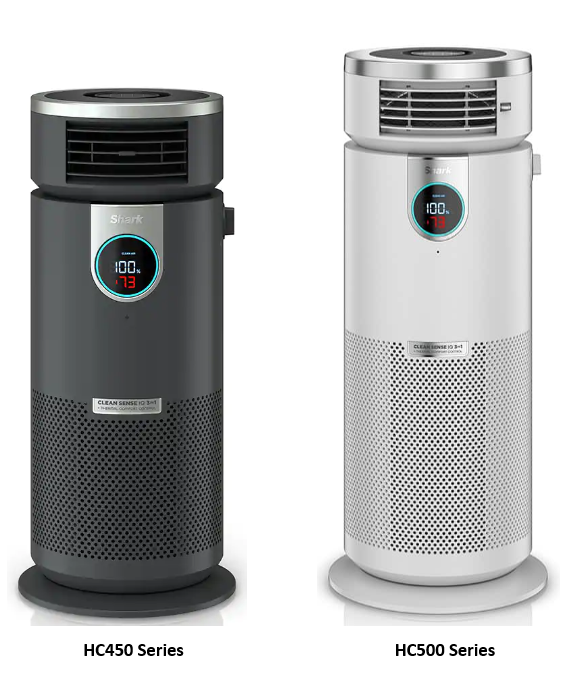
This article contains the HC500/450 Series Shark® Air Purifier 3-in-1 with True HEPA FAQs. This supports the HC500C, HC500, HC50C2, HC450C and HC452.
General Questions
How do I set up my air purifier?
1. Set up the air purifier on its base on a level floor. For best results, set it up in the space you spend the most time in, such as the kitchen, living room, or bedroom. Make sure the air purifier is at least 3 feet (0.9 m) away from all walls, large objects, or electronics.
2. Before plugging in the air purifier for the first time, you must remove the filter and take it out of its packaging. First, open the filter door on the backside of the air purifier.
3. Remove the filter from the air purifier and take it out of its sealed plastic packaging. Then, reinstall it into the air purifier. DO NOT run the air purifier unless the filter is removed from its packaging and installed correctly.
4. With the filter installed, replace the filter door.
5. Plug the air purifier into an electrical outlet and press the power button on either the top of the air purifier or on the remote to power on.
6. Once the air purifier is turned on, it will begin to read the air quality in your room. This calibration process will run for a few seconds and is indicated by the rotating lights the front display. Once the calibration is complete, you can begin to customize the settings on your air purifier.
Where is the best place to put my air purifier?
To benefit the most from your 3-in-1 Air Purifier, Shark® recommends placing the air purifier in the room where you spend the most time. Be sure that the air purifier is placed on a flat surface, near an outlet, and away from other furniture or items in order to keep the intake vents clear. For maximum air flow, keep the air purifier at least 3 feet (0.9 m) away from the wall.
Does this air purifier have a HEPA filter?
Yes, this air purifier features a Shark® Nanoseal™ filter with True HEPA that captures 99.98% of particles down to the 0.1–0.2 micron range.
What is PM?
PM stands for particulate matter. This term refers to microscopic solids or liquid droplets that are suspended in air and can cause serious health problems if inhaled. Using Clean Sense IQ™, the Shark NeverChange™ Air Purifier tracks 3 distinct sizes of particulate matter: PM1.0, PM2.5, and PM10. Each of these particulate sizes corresponds to common household pollutants. PM1.0 includes ultra-fine allergens* (allergens refers to non-living matter). PM2.5 includes smoke. PM10 includes dust and pollen.
What accessories are included with my air purifier?
Your Shark® 3-in-1 Air Purifier comes with 1 pre-installed filter. Please be sure to remove the filter from its packaging before initial use.
Can I leave my air purifier on at all times (24/7)? How does that affect lifespan of the product?
While your air purifier can be left running 24/7, longer runtimes may shorten the filter lifespan. Shark® recommends keeping your air purifier in Purified Air AUTO mode to optimize the filter life. To enable, turn the dial toward the Purified Air icon and the air will now be diffused out of the back of the air purifier.
After 100% clean air status is achieved for 10 minutes in AUTO mode, your air purifier will enter ECO mode and further optimize your filter life.
Where can I find the remote?
The remote can be found nested on top of the air purifier. This control panel style remote can be removed from the air purifier body to be used as a portable remote. When using the control panel as a remote, be sure to point it toward the front display screen for best results.
What if I lose my remote?
To order a new remote, please visit Sharkaccessories.com.
What type of battery does the remote require?
The battery for the 3-in-1 Air Purifier remote is a CR2025 lithium coin cell battery.
How long will the remote battery last?
The remote battery has a battery life of up to 3 years.
Using the Air Purifier
How does this product clean my air?
The Shark® 3-in-1 Air Purifier is equipped with a 3-stage HEPA filter that is designed to capture 99.98% of particles down to the 0.1–0.2 micron range, plus odors and VOCs. The cylindrical structure pulls air through the back and sides of the air purifier and passes it through the HEPA filter.Particles such as smoke and allergens* (allergens refers to non-living matter) are then trapped in the HEPA filter, allowing only clean air to be passed through the top vents.
How can I tell if my air is clean?
The illuminated air quality ring on the front display will change color as your air quality changes. The color of the ring indicates the air quality: Blue = Good air quality, Amber = Fair air quality, Red = Poor air quality. By pressing the AIR INFO button on your air purifier, you can switch between air quality info options. These include percentage of clean air, estimated time until the air will be clean, and the estimated number of PM1.0, PM2.5, and PM10 particles in the air surrounding the air purifier.
When enabled in Purified Air mode, the AUTO mode setting automatically adjusts the fan speed of your air purifier based on the air quality. (If the air quality decreases, the fan speed will increase.) To activate AUTO mode, make sure the side dial on the air purifier is turn toward the purified air icon. Press the AUTO button on the remote. When this option is selected, the AUTO icon will appear on your front display. To turn off AUTO mode, press the AUTO button again or manually change the fan speed.
Does this air purifier reduce odors?
Yes, the Shark® 3-in-1 Air Purifier filter is equipped with activated carbon. This is designed to absorb household odors and VOCs (volatile organic compounds) such as formaldehyde, acetone, and butanol. Depending on the model purchased, the type of filter may vary.
Why is my air quality always at 100%?
If your air purifier display reads 100%, your air quality is good. However, air quality will fluctuate as you introduce pollutants into your home. Activities like smoking, cooking, dusting, or spraying cleaning products (among other things) can add more pollutants to your air. Clean Sense IQ™ tracks this fluctuation in real time and alerts you when your air quality decreases. Air quality is measured by the amount of particulate matter in your air. To accurately calculate the percentage of air that is clean, Clean Sense IQ™ tracks 3 distinct particle sizes: PM1.0, PM2.5, and PM10. However, particles in your air can be both larger and smaller than this range. Rest assured, our Nanoseal™ True HEPA technology is cleaning the air by capturing odors and 99.98% of particles down to the 0.1–0.2 micron range.
Why is my air quality never at 100%?
If your air quality never reaches 100%, make sure that the filter is properly installed without its original plastic packaging. If the filter is properly installed, then it may need replacement. Note that the filter generally requires replacement every 6–12 months, but if a high amount of particulate matter is regularly present in your air, you may need to replace the filter more often. Activities like smoking, burning candles, running a humidifier, opening windows, and cooking (among other things) can add more pollutants to your air. Make sure to survey your environment and remove anything that could be causing low air quality.
Why is my air quality at 100%, but the air smells bad?
Air quality is measured by the amount of particulate matter in your air. To accurately calculate the percentage of air that is clean, Clean Sense IQ™ tracks 3 distinct particle sizes: PM1.0, PM2.5, and PM10. However, odors are not included in this calculation. Rest assured, our Nanoseal™ True HEPA technology is actively capturing odors and VOCs while you run your air purifier.
Why is my air quality reduced even when I am not cooking or doing anything unusual?
Air quality can change for a variety of reasons. Even everyday activities can agitate particles (such as previously settled dust) into the air, which will decrease air quality. Clean Sense IQ™ does a reading of microscopic particulate matter in the room and displays the air quality accordingly.
What is AUTO mode and when should I use it?
When enabled in Purified Air mode only, the AUTO mode setting automatically adjusts the fan speed of your air purifier based on the air quality. (If the air quality decreases, the fan speed will increase.) To activate AUTO mode, make sure the side dial on the air purifier is turn toward the purified air icon. Press the AUTO button on the remote. When this option is selected, the AUTO icon will appear on your front display. To turn off AUTO mode, press the AUTO button again or manually change the fan speed.
How do I mute the beeping?
To mute your air purifier's beeping, hold the BRIGHTNESS button for 1.5 seconds. You will hear auditory feedback (3 beeps) once the setting is confirmed. The beeps are now muted.
How do I unmute the beeping?
To unmute your air purifier's beeping, hold the BRIGHTNESS button for 1.5 seconds. You will hear auditory feedback (3 beeps) once the setting is confirmed. The beeps are now unmuted.
How do I enable child lock?
To enable the child lock setting and lock the remote buttons, hold the TIMER and OSCILLATION buttons at the same time for 1.5 seconds. You will hear auditory feedback once the setting is confirmed. The control panel is now locked.
How do I disable child lock?
To disable the child lock setting and unlock the remote buttons, hold the TIMER and OSCILLATION buttons at the same time for 1.5 seconds. You will hear auditory feedback once the setting is confirmed. The control panel is now unlocked.
How does the dim setting work?
The brightness button adjusts the brightness of the front display screen. Press the button to switch between 3 options: full brightness, partially dim, and fully dim.
Cleaning and Maintenance
How do I maintain my air purifier?
Both the exterior and the interior of your air purifier will need to be dusted periodically. For best results, clean the air purifier every two months or more often if necessary. When cleaning dust from the exterior, use a microfiber cloth to remove debris from the surface of the air purifier. To sanitize, wipe down the exterior with a warm, soapy cloth. Avoid excess water and abrasive chemical cleaners to prevent damage. When cleaning dust from the interior, lift off the filter cover, remove the filter, and use a vacuum cleaner or a microfiber cloth to remove dust and debris from the interior of the air purifier. DO NOT use abrasive chemical cleaners on the inside of the air purifier. DO NOT insert cleaning instruments into the fan outlet.
How do I optimize my filter life?
To maximize your air purifier's filter life and performance, Shark® recommends leaving your air purifier in AUTO mode. After 100% clean air status is achieved for 10 minutes in AUTO mode, your air purifier will enter ECO mode and further optimize your filter life. Shark®™ also recommends flipping and rotating the direction of your filter every 3 months. This will help equalize and balance the distribution of captured particles throughout the filter, allowing for extended usage.
How often do I need to replace the filter?
Shark® recommends changing the filter every 6–12 months. When the filter needs to be changed, the FILTER LIFE text will flash on the front display. If you or a member of your household is sensitive to allergens, you may benefit from changing the filter more frequently. To check the remaining filter lifespan, press the Info button on the remote until your display shows the filter life air quality view. This is the percentage of filter life remaining before the filter needs to be changed.
Can I wash the filter?
No, the filter is not washable. Keep the filter away from water and dispose of it when dirty.
Can I use any replacement filter?
Only use Shark® brand filters when operating your air purifier. Other filters may cause damage to your air purifier. There are multiple different size and shape Shark® filters.
For HC450 series air purifiers, the following filters are compatible: HE1FKBAS, HE1FKBASMB, HE1FKPET.
For HC500 series air purifiers, the following filters are compatible: HE2FKBAS, HE2FKBASMB, HE2FKPET.
Replacement filters can be purchased here.
Where can I buy replacement filters?
Replacement filters can be purchased here.
Product Specs
What is the wattage?
1500 watts
What is the Amperage?
12.5 Amps
What is the Voltage?
120 volts
What is the cord length?
The cord is 6 feet long.
What is the weight?
12.78 lbs
What is the Dimensions?
10.43(L)x10.43(W)x23.6(H)